Skip to content

Security

Find what an outsider can see, before someone else does.

Once you prove a site is yours, Startica checks what anyone on the internet can see about it, from weak HTTPS and missing headers to exposed files and email that's easy to forge. Then it keeps watching for new subdomains, expiring certificates, look-alike domains and vulnerable libraries.

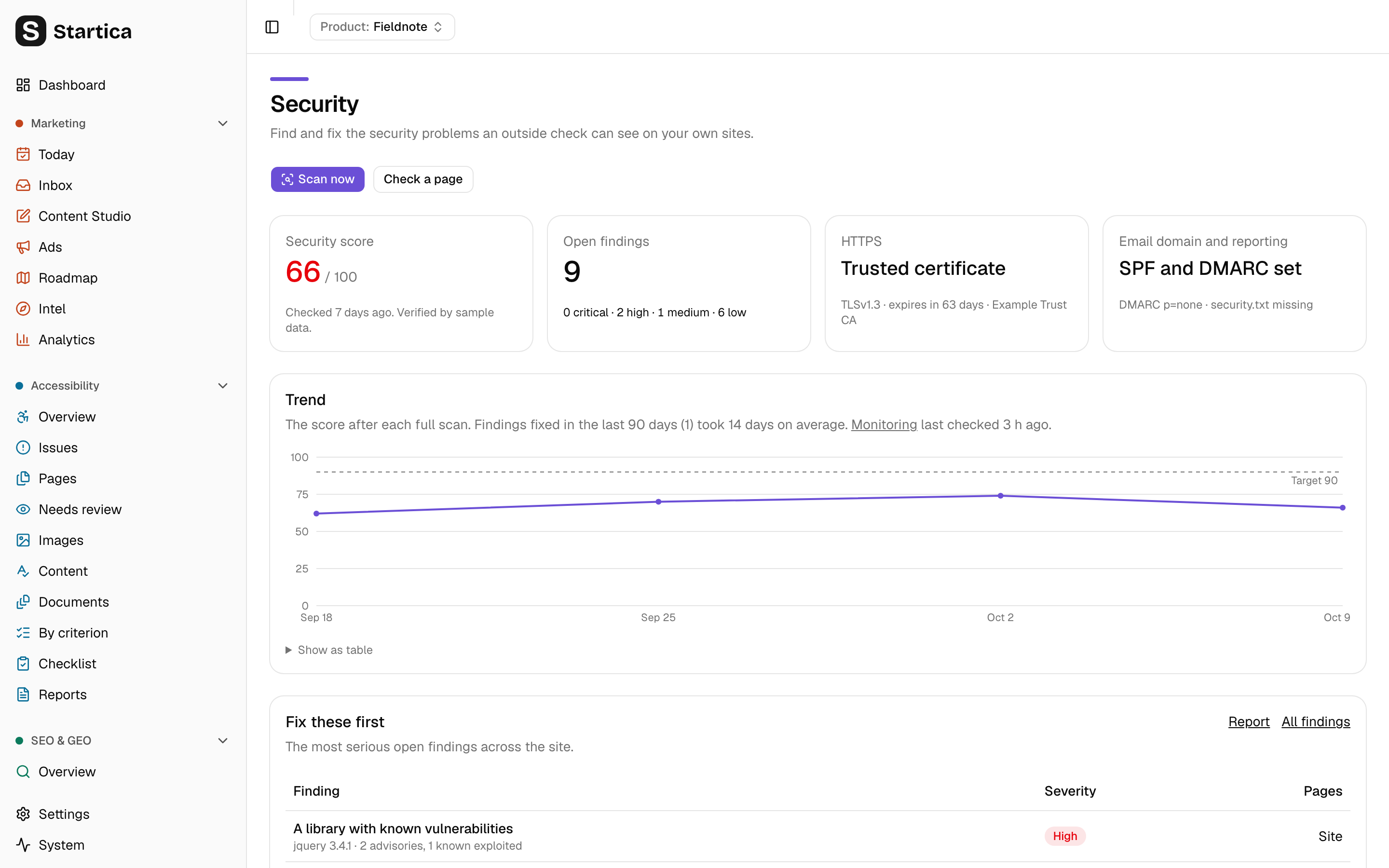
Startica's Security overview for fieldnote.example: security score 66 out of 100, 9 open findings, a trusted certificate, SPF and DMARC set, a score trend chart against a target of 90, and a Fix these first table starting with a library with known vulnerabilities
With the fictional demo product Fieldnote.

What it does

  • Proof of ownership

    Security checks run only on sites you prove are yours, with a DNS record, a file on the site, or your Search Console property. Sites on your own computer or network count automatically.

    Read the guide
  • Checks on every scan

    HTTPS and redirects, TLS version, certificate expiry, security headers, cookie flags, mixed content, scripts without integrity, directory listings, exposed .git and .env files, SPF, DMARC and security.txt.

    Read the guide
  • Findings and report

    Each finding with why it matters, how to fix it, a severity, its OWASP Top 10 category and related SOC 2 and ISO 27001 controls for your auditor. Accept a risk, mark a false positive, or recheck.

    Read the guide
  • Monitoring

    Every day, new subdomains from certificate logs, dangling DNS that could be taken over, expiring certificates, look-alike domains, changed third-party scripts, and libraries with known vulnerabilities, ranked by how likely they are to be exploited.

    Read the guide
  • AI help

    An explanation and fix written for the stack your site runs, and findings imported from another tool's report, so everything is in one list. On request, about two cents each.

    Read the guide
  • Disclosure kit

    A security.txt generator, a disclosure policy template, and a place to log problems people report to you, with AI triage and replies to copy.

    Read the guide

How it works

  1. Verify. Prove the site is yours. It takes a minute with a DNS record or a file, or nothing at all if Search Console already covers it.
  2. Check. From then on, every scan of the site also runs the security checks, on the same pages Accessibility and SEO & GEO already load.
  3. Fix. Findings are ranked by severity, each with how to fix it. Serious ones show on the Dashboard and Today, and can go to the Roadmap or to GitHub or GitLab issues.
  4. Recheck. Press Recheck after a fix, and the finding is marked fixed once it’s gone.
  5. Monitor. Once a day, Startica checks certificate logs, DNS and public vulnerability data for changes, and tells you what’s new.

Defensive only

Startica reads what any visitor’s browser receives: pages, response headers, cookies, certificates, public DNS records and a few well-known file paths. It never sends exploit payloads, fuzzes inputs, submits forms, tries passwords or crawls beyond your own pages, so it’s safe to run against production.

Honest about its reach

Outside checks see only the outside of a site. They don’t test how your application handles input, whether one user can see another’s data, or anything behind a sign-in. A short list of findings doesn’t mean a site is safe, and Startica never calls one secure, compliant, certified or pentested.

What it doesn’t do

  • It doesn’t attack anything. No exploits, no fuzzing, no logins, no human or crowd testing.
  • It doesn’t check sites you can’t prove are yours.
  • It doesn’t change your site or DNS. Fixes are for you to make.

What it costs

The checks and monitoring are free. Monitoring uses free public services (certificate logs, OSV.dev, FIRST EPSS and CISA’s list of exploited vulnerabilities), which receive only your domain, library names and versions, and vulnerability ids. AI help is optional, on your own key. See Privacy.

The other modules

Same app, same products, same sites.